
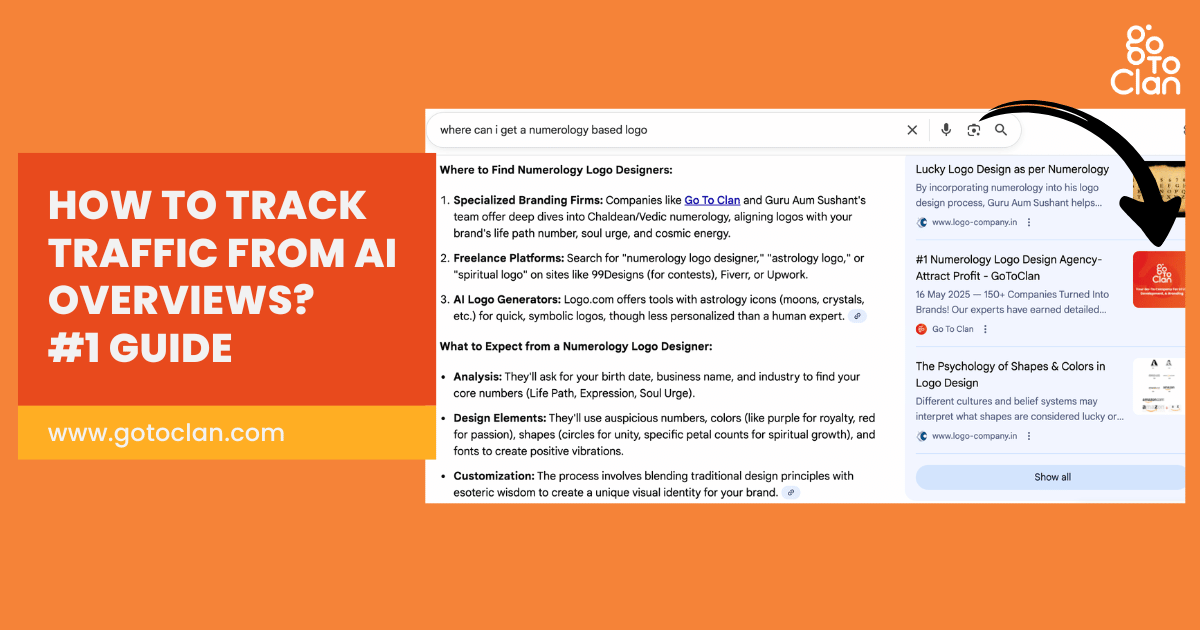
According to a report, organic click-through rates dropped by about 61% for informational queries. Thanks to Google AI Overviews. Hence, it is important to explore how to track traffic from AI Overviews. Most of Gen Z is using ChatGPT for browsing. Before I give away the steps, let me tell you a short story.
One fine day, I got a call from an unknown number. The person said, “I am Harsh from Pune, and I am looking for branding services. I came across your website, and I really liked your portfolio. Can you help me with logo and packaging design?”
I continued the conversation and scheduled a Google Meet for a detailed discussion. Before hanging up the phone, I asked where he got my number from. He said, “I asked ChatGPT to suggest good branding agencies in Pune, and it gave me Go To Clan’s name. Later, I googled and got your number.
I was stunned! I couldn’t believe that ChatGPT had recommended my company for branding work. That’s when I immediately started digging deeper. I wanted to understand who else was landing on my website through ChatGPT, which queries were triggering my content in AI Overviews, and how my blogs were being used as trusted sources.
My first question was “How to track AI traffic in GA4?”
In this blog, I am going to tell you a fine trick. I spent hours finding cracking this. Let me save your time. If you too want to learn how to track traffic from AI overviews and ChatGPT, then follow these simple steps.
TL;DR
- You cannot directly track traffic from AI Overviews yet
- GA4 helps track AI traffic via referral sources using regex filters
- Ahrefs and SEMrush show AI citations, not actual traffic
- Many AI visits appear as direct/unassigned, so the data is incomplete
- Use a mix of GA4 + Search Console + citation tools to understand patterns
- Focus on getting both visibility (citations) and clicks, not just mentions
- Go To Clan helps you create content that actually shows up inside AI answers
How to Track AI Traffic in GA4?
Most people say AI traffic can’t be tracked.
That’s not fully true.
Here’s a simple way to track traffic coming from AI tools inside GA4:
Go to Google Analytics
→ Click **Generate Leads**
→ Open **Traffic Acquisition**
→ Click **Add Filter**
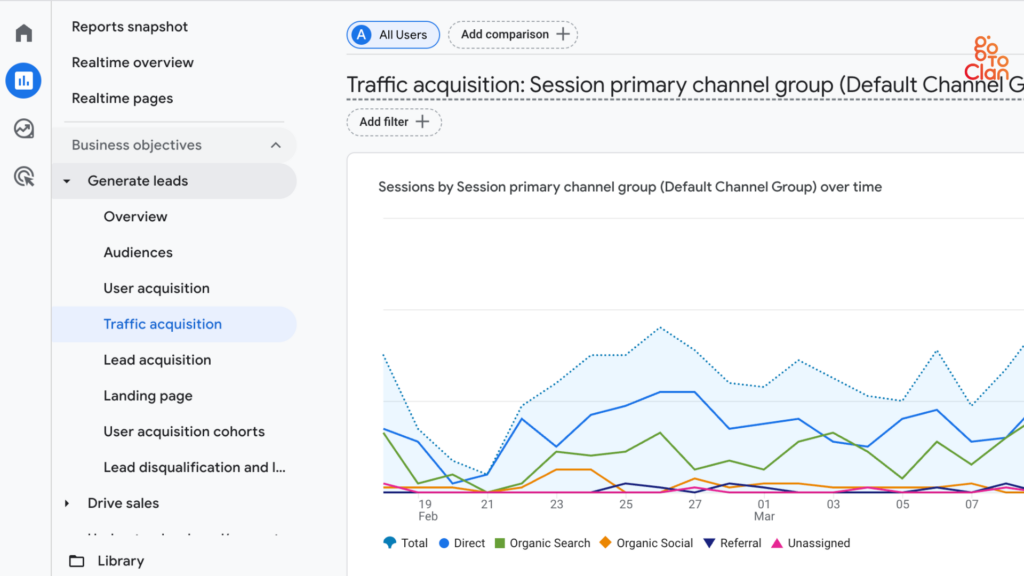
Set it up like this:
* **Dimension:** Session source / medium
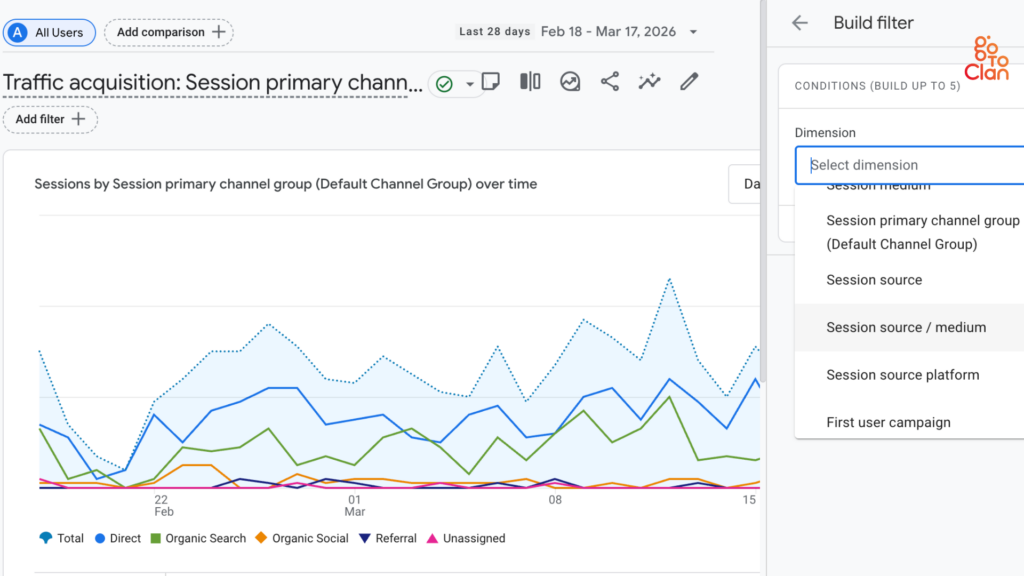
* **Match Type:** Matches regex
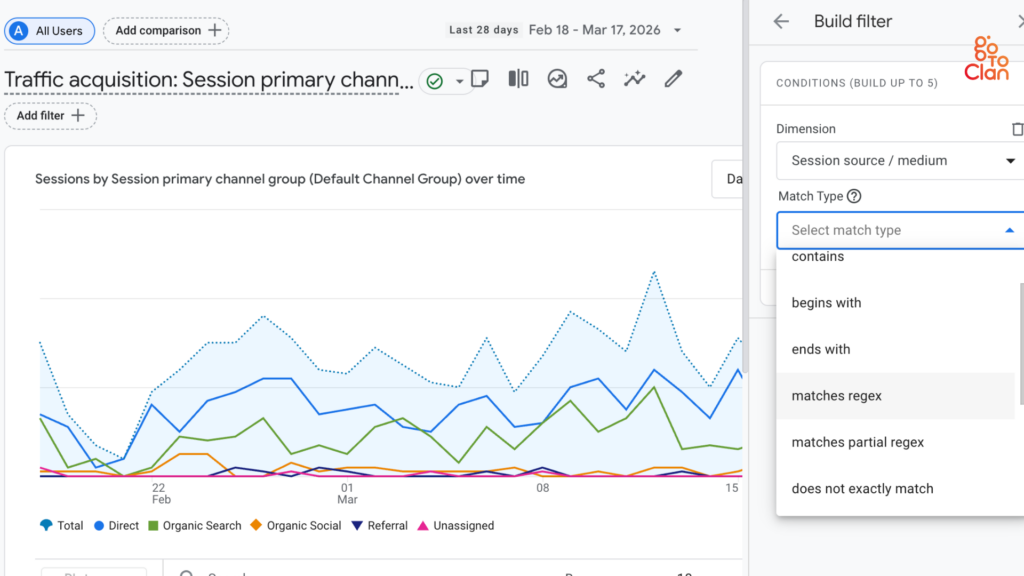
Paste this:
^.*\.openai.*|.*copilot.*|.*chatgpt.*|.*gemini.*|.*gpt.*|.*neeva.*|.*writesonic.*|.*nimble.*|.*perplexity.*|.*google.*bard.*|.*bard.*google.*|.*bard.*|.*edgeservices.*|.*bnngpt.*|.*gemini.*google.*$
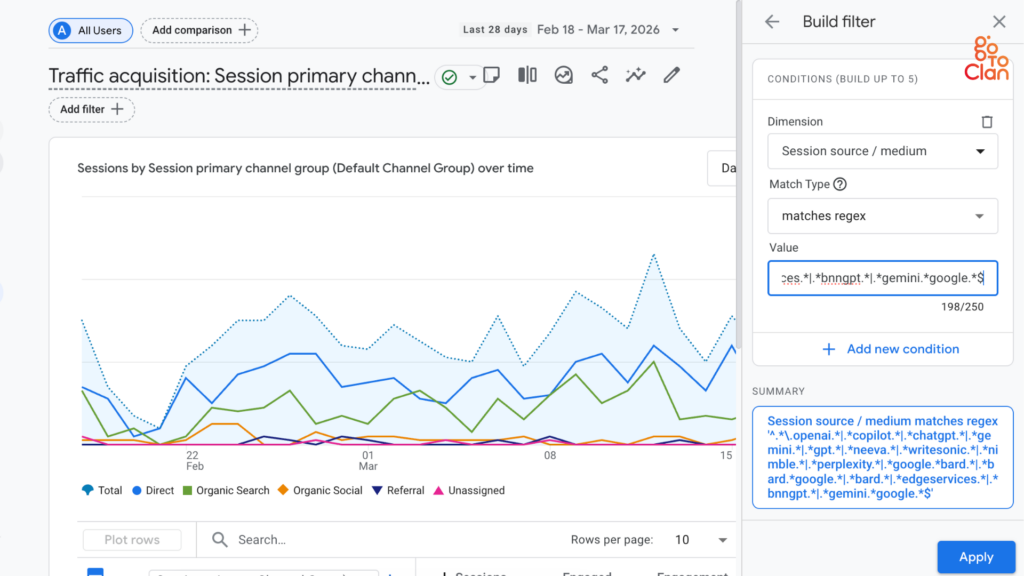
Click **Apply**
You can also adjust the date range from the top right to analyze trends over time.
That’s it.
You’ll now see traffic coming from sources like ChatGPT, Gemini, Perplexity, Copilot, and more; all in one place.
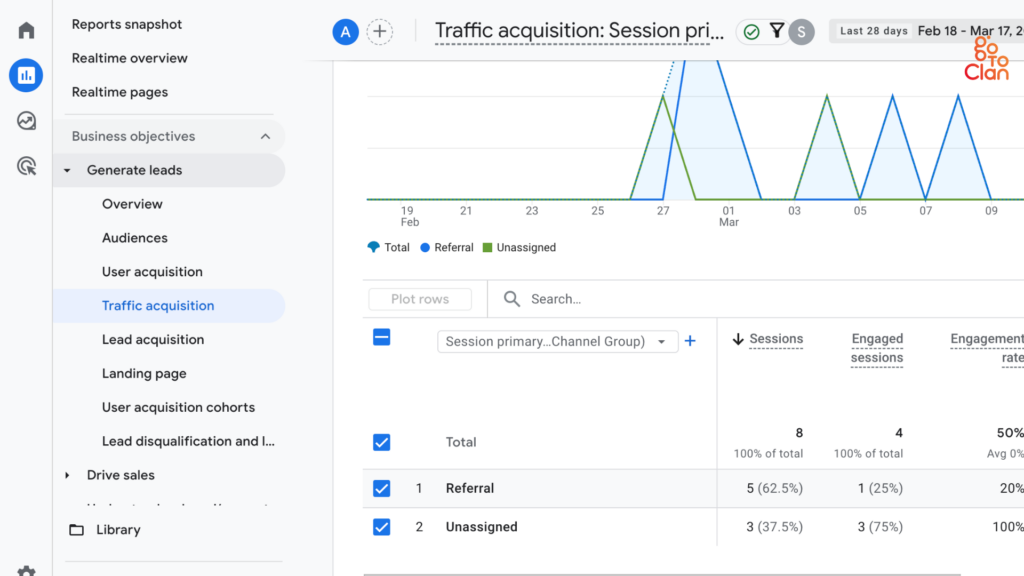
Note: This tracks **AI referral traffic only**. It won’t perfectly capture Google AI Overview clicks, but it’s the closest practical method right now.
How to Identify Which Pages Are Getting Traffic from AI Sources
Go to Google Analytics
→ Click **Generate Leads**
→ Open **Landing Page**
→ Click **Add Filter**
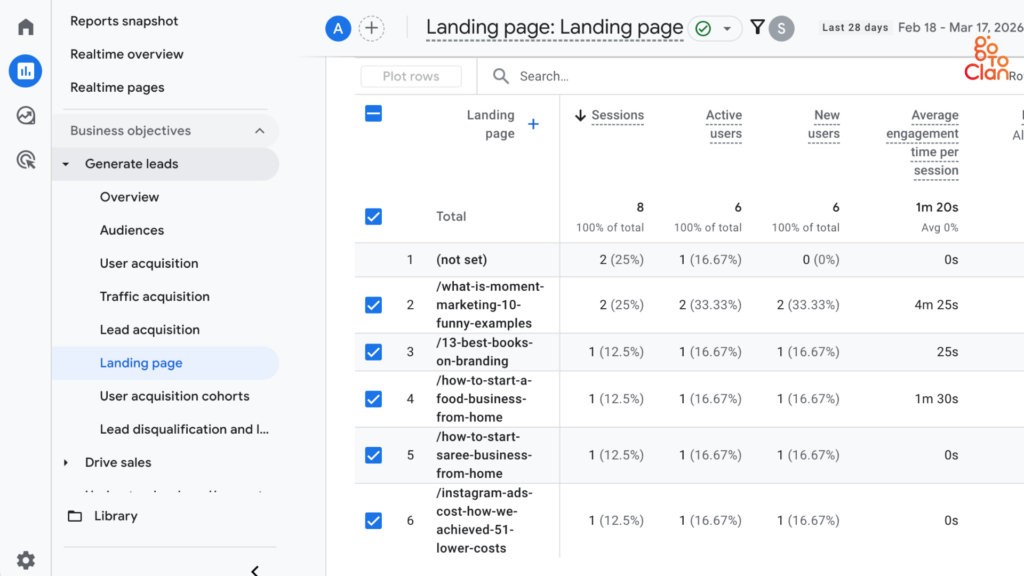
Set it up like this:
* **Dimension:** Session source / medium
* **Match Type:** Matches regex
Paste this:
^.*\.openai.*|.*copilot.*|.*chatgpt.*|.*gemini.*|.*gpt.*|.*neeva.*|.*writesonic.*|.*nimble.*|.*perplexity.*|.*google.*bard.*|.*bard.*google.*|.*bard.*|.*edgeservices.*|.*bnngpt.*|.*gemini.*google.*$
Click **Apply**
You will see a list of pages getting traffic from AI sources. You can also see the average time spent on each page.
For example, in the given image, we can see that people are engaging with these 2 blogs- “What is moment marketing” and “How to start a food business from home?”
How to Track Traffic from AI Overviews Using Tools?
Tools like Ahrefs and SEMrush do not show actual AI traffic. They show AI citations.
Here’s an example. With pure organic content marketing, I achieved these numbers for one of my clients. But this is not traffic. These are citations.
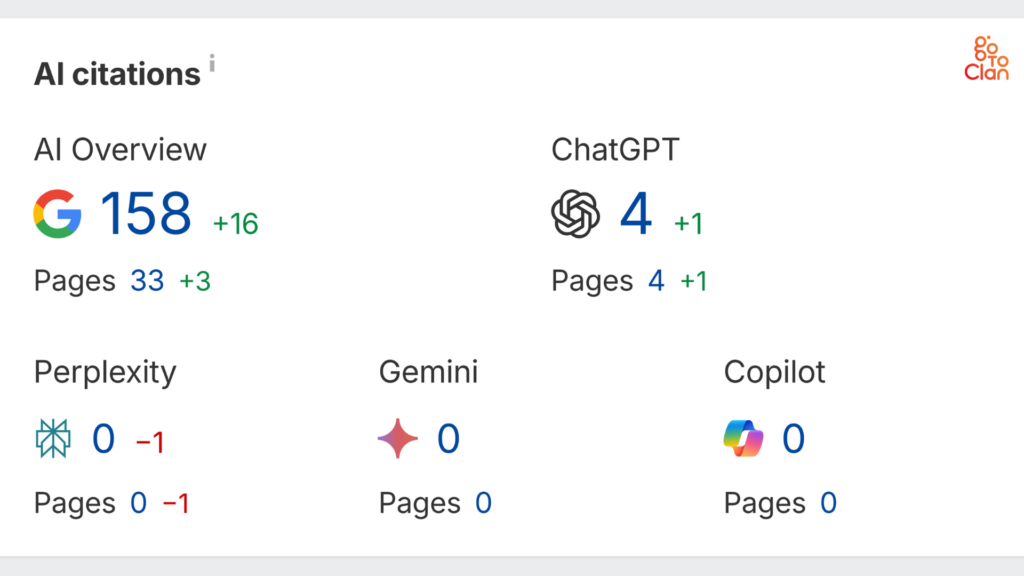
When you see dashboards like “AI citations,” it means:
- Your content is being used in AI answers
- Platforms include:
- Google AI Overview
- ChatGPT
- Gemini
- Perplexity
- Copilot
For example:
- “158 AI Overview” → Your content appeared 158 times in AI summaries
- “Pages 33” → 33 of your pages were used as sources
How to Rank in ChatGPT Search
Let’s clear one thing first. You don’t “rank” in ChatGPT the way you rank on Google. There is no position 1, 2, or 3.
But yes, you can get mentioned, cited, and recommended inside ChatGPT answers. And that’s the real game.
Here’s how to do it:
1. Focus on Answer-First Content
ChatGPT prioritizes content that directly answers user queries. If your blog takes too long to get to the point or is filled with unnecessary fluff, it is less likely to be used.
Start your sections with clear answers. For example, if the query is about tracking AI traffic, the first few lines should directly address that question. This increases the chances of your content being extracted and used in AI responses.
2. Write in Simple and Natural Language
AI models prefer content that is easy to process. Complex sentences, jargon, and overly technical language can reduce clarity.
Use simple English, short sentences, and a conversational tone. Write as if you are explaining the topic to someone with a basic understanding. This improves both readability and AI comprehension.
3. Structure Content for Easy Extraction
Well-structured content performs better in ChatGPT.
Use:
- Clear H2 and H3 headings
- Short paragraphs
- Bullet points where needed
This helps AI models quickly identify key information and extract it accurately. Poorly structured content often gets ignored, even if the information is useful.
4. Build Strong Topical Authority
One blog is not enough to establish credibility. According to a blog by WittySparks, AI prefers sites that divides main topic into multiple blogs where each sub-topic is explained in detail.
If you consistently publish content around a specific topic, it signals authority. For example, writing multiple blogs on AI traffic, AI SEO, and GA4 tracking creates a strong content cluster. This increases the likelihood of your content being referenced across different AI queries.
5. Include Practical Examples and Clear Explanations
Generic content is less likely to be used.
Add:
- Real examples
- Step-by-step processes
- Clear use cases
AI prefers content that provides actionable value. The more practical your content is, the higher the chances of it being selected.
6. Optimize for Conversational Queries
Users interact with AI tools using full questions, not just keywords.
Instead of targeting only short keywords, focus on:
- Question-based queries
- Long-tail phrases
- Natural language searches
This aligns your content with how people actually use ChatGPT and similar tools.
7. Strengthen Your Overall Online Presence
ChatGPT does not rely on a single source. It pulls information from multiple signals across the web.
Having a consistent presence across your website, blogs, and professional platforms helps reinforce your credibility. The stronger your digital footprint, the higher your chances of being cited.
Final Words
If you are trying to understand how to track traffic from AI Overviews, the truth is that there is no perfect one-click report yet. But that does not mean you cannot measure its impact.
By looking at the right signals, such as AI citations, page-level traffic shifts, and search behavior patterns, you can start getting a much clearer picture of how AI is influencing your visibility. The key is to stop expecting exact labels and start reading the clues smartly.
As AI-led search keeps growing, businesses that learn this early will stay ahead of the curve. And if you want content that is built not just for Google rankings but also for AI visibility, Go To Clan can help you create strategy-led content that puts your brand in the right places.
Key Takeaways
- AI traffic cannot be tracked perfectly yet, especially from AI Overviews
- Tools like Ahrefs and SEMrush show AI citations, not actual traffic
- GA4 helps track partial AI traffic through referral sources like ChatGPT and Perplexity
- A large portion of AI traffic may appear as direct/unassigned, making it harder to measure
- The best approach is to combine GA4, Search Console, and citation tools to understand patterns
- Focus on improving both AI visibility and click intent, not just getting cited